


Premium Vector Art Conversion: Get Cleaner Graphics
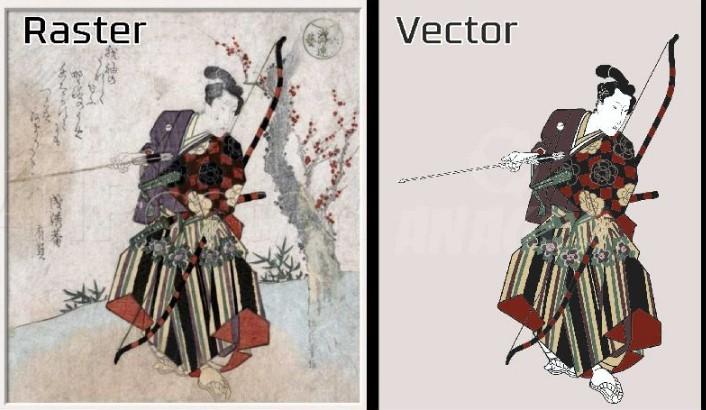
A blurry logo can make an otherwise professional business look unfinished. Whether you are preparing artwork for printing, embroidery, packaging, signage, or digital marketing, poor image quality can quickly become a problem.
That is where Premium Vector Art Conversion comes in. Instead of working with a pixel-based image that becomes blurry when enlarged, vector conversion transforms artwork into clean, scalable paths. The result is graphics that stay sharp across different sizes and applications.
But premium conversion is more than simply changing a JPG or PNG into another file type. Good vector artwork requires careful tracing, accurate shapes, clean curves, proper colors, and attention to small details.
What Is Premium Vector Art Conversion?
Premium vector art conversion is the process of turning raster artwork, such as JPG, PNG, or scanned images, into editable vector graphics.
Raster images are made from pixels. When you enlarge them too much, those pixels become visible and the image starts to look blurry.
Vector graphics work differently. They use mathematical paths, points, curves, and shapes. Because of this, the artwork can be resized without losing its sharp appearance.
Common vector formats include:
- AI
- EPS
- SVG
- CDR
For example, imagine you have a small company logo saved as a low-resolution PNG. You want to print that logo on a large outdoor sign. Simply stretching the PNG may create a pixelated result.
Professional vector conversion recreates the logo using clean paths so it can be enlarged while maintaining its quality.
Why Does Vector Conversion Matter?
Good artwork is the foundation of many visual projects. If the original graphic is poorly prepared, problems can appear during printing, cutting, engraving, or production.
Premium vector artwork helps because it provides:
Better Image Quality
Vector graphics remain sharp whether they are used on a small business card or a large banner.
Easy Scaling
You can resize the artwork without worrying about pixelation or loss of clarity.
Cleaner Printing
Professional vector files provide well-defined shapes and edges, which can help printers produce more accurate results.
Easier Editing
Individual shapes, colors, and elements can usually be edited more easily than in a flattened raster image.
Better Production Compatibility
Many printing, cutting, engraving, and manufacturing workflows work more effectively with properly prepared vector artwork.
What Types of Images Can Be Converted?
Almost any suitable raster-based artwork can be converted into vector format, although the difficulty depends heavily on image quality and complexity.
Common examples include:
- Business logos
- Product graphics
- Sports designs
- T-shirt artwork
- Badges and emblems
- Illustrations
- Mascots
- Line drawings
- Typography-based designs
- Simple icons
- Promotional artwork
A clean, high-resolution image is usually easier to convert than a tiny, blurry screenshot.
However, even complicated artwork can sometimes be recreated with careful manual tracing and editing.
Premium Vector Art Conversion vs. Automatic Tracing
Automatic tracing tools can be useful for simple graphics. They can quickly detect edges and generate vector paths.
The problem is that automatic conversion does not always understand what the artwork is supposed to look like.
It may create:
- Too many unnecessary anchor points
- Uneven curves
- Broken shapes
- Incorrect colors
- Overlapping objects
- Rough edges
- Unwanted background elements
Professional vector conversion takes a more controlled approach.
Instead of accepting the first automated result, the artwork can be manually cleaned, adjusted, and refined.
Think of automatic tracing as using a rough sketching tool. Professional conversion is more like having an artist carefully redraw the design.
What Does a Professional Vector Conversion Process Include?
A quality conversion normally involves several stages.
1. Artwork Inspection
The first step is examining the original image.
The converter looks at its resolution, colors, shapes, text, background, and overall complexity.
This helps determine the best approach.
2. Image Preparation
The original artwork may need cleaning before tracing begins.
Backgrounds, unwanted marks, noise, and other distractions can be removed to make the main design easier to recreate.
3. Shape and Path Creation
The artwork is recreated using vector paths.
Curves and outlines are carefully positioned to match the original design rather than simply following every pixel.
4. Color Separation
Colors are identified and assigned appropriately.
For artwork with multiple colors, proper separation is important because incorrect color areas can affect the final appearance.
5. Curve and Anchor Point Refinement
Too many anchor points can make artwork difficult to edit and can create rough-looking curves.
A professional file uses points strategically to create smoother shapes.
6. Text Recreation
If the artwork contains lettering, fonts and spacing need special attention.
When the original font is unavailable, the lettering may need to be recreated or converted into outlines while maintaining its visual appearance.
7. Final Cleanup
The completed artwork is checked for gaps, overlaps, unnecessary points, uneven edges, and other technical problems.
8. File Export
The finished vector artwork can then be exported in the format needed for the intended application.
How to Choose the Right Vector File Format
Different projects may require different formats.
AI Files
AI files are commonly used for editable vector artwork and professional design workflows.
EPS Files
EPS is widely used for logos, printing, publishing, and other professional applications.
SVG Files
SVG is especially useful for websites, digital graphics, cutting machines, and applications that support scalable web graphics.
PDF Files
A properly created vector PDF can be useful for sharing artwork while maintaining scalable elements.
CDR Files
CDR is commonly associated with vector design workflows and may be requested for specific production or editing environments.
The best format depends on where the artwork will be used.
Key Features of Premium Vector Art Conversion
If you are paying for professional conversion, the service should focus on more than simply producing a vector extension.
Look for qualities such as:
- Smooth and accurate paths
- Clean edges
- Correct proportions
- Proper color separation
- Editable artwork
- Minimal unnecessary anchor points
- Accurate typography
- Transparent or clean backgrounds
- Suitable output formats
- Quality checking before delivery
These details may seem small, but they can make a major difference in the final result.
When Do You Need Professional Vector Conversion?
You may need professional vector artwork when:
- Your logo looks blurry when enlarged.
- A printer requests a vector file.
- You need artwork for large-format printing.
- Your design must be edited professionally.
- You need files for vinyl cutting or signage.
- A manufacturer requires editable artwork.
- You want to preserve a logo for future projects.
- Your original artwork is only available as a low-resolution image.
Having a clean master vector file can save time because you can reuse it for many future applications.
Vector Conversion for Printing
Printing is one of the most common reasons people request vector artwork.
A logo may appear on business cards, brochures, packaging, posters, clothing, banners, and promotional products.
Each application may require a different size.
A vector master file makes this much easier because the artwork can be scaled without creating the blurry edges associated with enlarged raster graphics.
For professional printing, it is also important to consider color requirements, document setup, outlines, and the printer's preferred file format.
Vector Artwork for Embroidery
Vector artwork and embroidery digitizing are different processes, but they often work together.
A vector logo can provide clean shapes and defined colors that make it easier to understand the structure of a design before it is digitized.
However, simply converting a vector file into an embroidery file does not automatically create a stitch-ready design.
Embroidery digitizing still requires decisions about:
- Stitch types
- Stitch direction
- Density
- Underlay
- Pull compensation
- Thread colors
- Fabric type
- Design size
In other words, vector conversion prepares artwork, while digitizing translates that artwork into instructions an embroidery machine can stitch.
Common Mistakes in Vector Conversion
Not every vector file is a good vector file.
Several mistakes can reduce the quality of converted artwork.
Using Automatic Tracing Without Cleanup
Automatic tracing may create hundreds or thousands of unnecessary points. This can make the file harder to edit and produce rough curves.
Ignoring Small Details
Tiny details can be important to a logo's identity. Removing them without considering the intended use may change the design.
Using Too Many Colors
Unnecessary color variations can make artwork more complicated than needed and may create production problems.
Poor Typography
Incorrect fonts, spacing, alignment, or letter shapes can make a recreated logo look noticeably different from the original.
Forgetting the Final Application
Artwork intended for screen display may have different requirements from artwork intended for printing, cutting, or embroidery.
The final use should always influence how the vector file is prepared.
Tips for Getting Better Conversion Results
You can make the conversion process easier by preparing your source artwork properly.
Provide the Best Image Available
A high-resolution original gives the converter more information to work with.
Explain the Intended Use
Tell the designer whether the artwork will be used for printing, signage, apparel, embroidery, web graphics, or another purpose.
Specify the Required Format
If a printer or production partner requires EPS, SVG, AI, or another format, mention it before the work begins.
Identify Important Details
If specific colors, fonts, proportions, or design elements must remain unchanged, communicate those requirements clearly.
Request Editable Artwork
If you expect to make future changes, ask for an editable vector file rather than only a flattened export.
How Much Does Vector Art Conversion Cost?
The cost of vector conversion depends on the artwork rather than simply the file format.
Simple logos with a few shapes may take relatively little work. Detailed illustrations, complex mascots, gradients, textures, and difficult lettering can require much more time.
Factors that can affect pricing include:
- Artwork complexity
- Number of colors
- Level of detail
- Image quality
- Number of required formats
- Editing requirements
- Turnaround time
- Manual tracing involved
A low-cost conversion is not always the best value if the resulting file requires extensive cleanup.
How to Evaluate a Vector Art Conversion Service
Before choosing a service, review examples of previous work.
Pay attention to whether the converted designs have smooth curves, clean edges, accurate colors, and natural-looking shapes.
You should also consider:
- Portfolio quality
- File formats offered
- Revision policy
- Turnaround time
- Communication
- Artwork confidentiality
- Final file quality
- Production requirements
A good provider should understand both the visual and technical sides of vector artwork.
Premium Vector Art Conversion: A Practical Checklist
Before accepting your final file, check the following:
- Is the artwork sharp at different sizes?
- Are the curves smooth?
- Are the colors accurate?
- Is the background handled correctly?
- Are there unnecessary anchor points?
- Does the lettering look correct?
- Are shapes properly aligned?
- Is the file editable?
- Is the requested format included?
- Does the file work for its intended production method?
This simple checklist can help catch problems before the artwork reaches the printer or manufacturer.
Final Thoughts
Premium Vector Art Conversion is about much more than changing a raster image into a vector file. The real goal is to create clean, accurate, scalable artwork that works reliably across different applications.
Whether you need a logo for printing, a graphic for apparel, artwork for signage, or a clean source file for future editing, professional vector conversion can give you a dependable foundation.
The key is to focus on quality rather than the file extension alone. Smooth paths, accurate shapes, clean colors, proper typography, and thoughtful preparation are what turn an ordinary conversion into professional vector artwork.
FAQs
1. What is Premium Vector Art Conversion?
Premium Vector Art Conversion is the process of recreating raster artwork as clean, scalable vector graphics while preserving important shapes, colors, text, and design details.
2. Which files can be converted into vector artwork?
Common source files include JPG, PNG, BMP, TIFF, and scanned artwork. The difficulty depends on the image quality and design complexity.
3. Is automatic image tracing enough for professional artwork?
Automatic tracing can work for simple designs, but detailed artwork often benefits from manual cleanup and refinement to achieve smoother paths and better accuracy.
4. What is the best vector format?
There is no single best format for every project. AI, EPS, SVG, PDF, and CDR may all be useful depending on the software, printer, or production method.
5. Can vector artwork be used for embroidery?
Yes, vector artwork can serve as useful source artwork for embroidery digitizing. However, it still needs to be converted into an embroidery file with appropriate stitch settings before it can be stitched.

 Български
 Russian